Halloween Fall Digital Pattern: A Versatile Resource for Creative Projects
The Halloween Fall Digital Pattern is a valuable digital asset that offers creators, designers, and hobbyists an easy way to infuse seasonal charm into their work. With its rich visuals and high-resolution format, it's perfect for those who want to bring the spirit of autumn and Halloween together in their designs. This article explores what makes this pattern useful, how it can be applied across various platforms, and what you should consider before using it.
What Is Included in the Halloween Fall Digital Paper Set?
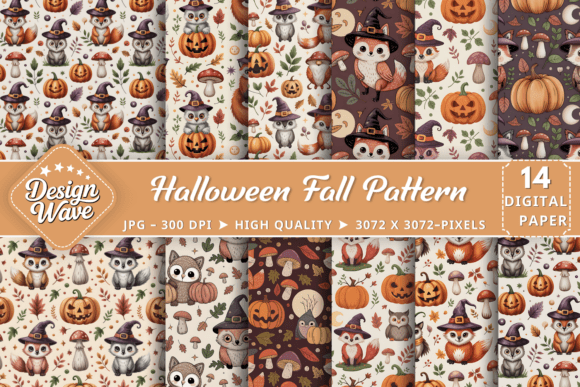
The Halloween Fall Digital Pattern set includes 14 distinct designs in JPEG format, each measuring 3072x3072 pixels and offering a resolution of 300 DPI. These specifications ensure that every file is suitable for both digital and print applications without compromising quality. Importantly, all files are clean and professional — they come without watermarks, making them ideal for commercial use or personal projects alike.
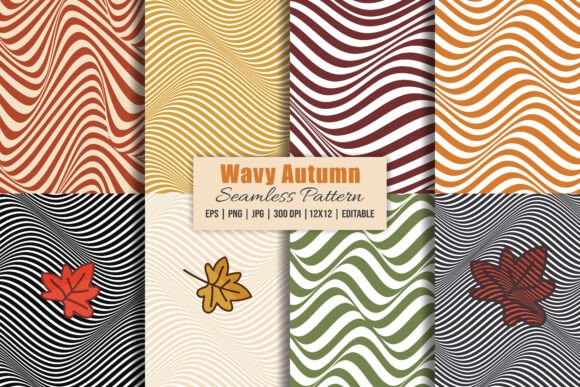
This collection is crafted with attention to detail, capturing the essence of fall through elements like leaves, pumpkins, bats, and other Halloween-themed graphics. The patterns blend warm autumnal colors with spooky accents, providing a cohesive aesthetic that appeals to a wide audience.
Key Features at a Glance:
- 14 Unique Patterns: Each design brings something different to your creative toolkit, whether it's a subtle background texture or a bold foreground graphic.
- High-Resolution JPEGs: Files are optimized for clarity and crispness on screens and in print.
- 300 DPI Quality: Ensures sharp output when printed on items such as posters, cards, or fabric.
- No Watermarks: You get full, clean access to each image, ready for immediate use.
- Digital Download Only: No physical products included, but the digital nature allows for instant access and unlimited uses.
Where Can You Use the Halloween Fall Digital Pattern?
One of the standout qualities of the Halloween Fall Digital Pattern is its adaptability. Whether you're working on a personal craft project or preparing materials for a business, these patterns can enhance your visual content significantly. Here are some common use cases:
Sublimation Products
These patterns are excellent for sublimation printing. They can be used to create custom mugs, tumblers, and even clothing items with a festive look. Their high resolution ensures that the final product looks professional and appealing.
Printed Merchandise
From holiday cards to invitations, the Halloween Fall Digital Pattern adds a touch of seasonal flair. It's also great for designing planner stickers, wall art, and posters. For entrepreneurs selling online, these designs can elevate product packaging and branding during the fall season.
Digital Media
Designers can incorporate these patterns into digital scrapbooking layouts, website headers, or social media templates. They provide a quick and effective way to maintain a consistent theme while keeping content fresh and engaging.
Crafting and DIY Projects
For hobbyists and creatives, the Halloween Fall Digital Pattern is a go-to resource for adding depth to handmade items like scrapbooks, framed artwork, and decorative pillows. Its versatility means it can be scaled, rotated, or layered to suit individual preferences.
Who Benefits from Using These Patterns?
The Halloween Fall Digital Pattern caters to a diverse audience, including:
- General Consumers: Those looking to personalize gifts or decorations for Halloween or fall events will find this set incredibly helpful.
- Professionals: Graphic designers, marketing teams, and event planners can use these patterns to streamline seasonal design workflows and meet client demands quickly.
- Business Owners: Retailers and e-commerce sellers benefit from using these designs to update their product lines, packaging, and promotional materials in time for the holidays.
- Online Users: Bloggers, YouTubers, and Instagrammers can integrate these patterns into their content to attract seasonal traffic and engage their audiences with themed posts.
Why Choose This Set Over Others?
There are many digital pattern sets available, but the Halloween Fall Digital Pattern stands out due to its balance between aesthetics and functionality. Unlike some free resources that may include low-resolution images or hidden watermarks, this set provides clean, professional-grade JPEGs that are immediately usable. The inclusion of 14 unique patterns also gives users more options to match specific color schemes or themes.
Moreover, since the set is designed for multiple purposes, it eliminates the need to source separate images for backgrounds, overlays, or textures. This saves time and effort, especially for creators managing several projects simultaneously.
Real-World Applications and Examples
To better understand how the Halloween Fall Digital Pattern can be utilized, let’s explore a few real-world scenarios:
Scenario 1: Designing Seasonal Invitations
A small business owner wants to send out Halloween-themed party invitations. Instead of hiring a designer or creating one from scratch, they download the Halloween Fall Digital Pattern set and choose a design that complements their brand. They then layer text and logos over the pattern to create a visually striking yet cost-effective invitation.
Scenario 2: Creating Custom Wall Art
An artist plans to sell Halloween-themed prints online. They use one of the Halloween Fall Digital Patterns as a base, add hand-drawn illustrations, and export the final design for printing. The result is a professional-looking piece that customers love for home décor.
Scenario 3: Updating Social Media Content
A blogger aims to refresh their website for the fall season. They apply a Halloween Fall Digital Pattern to the header section, ensuring it aligns with their site’s layout. The updated look helps increase engagement and makes the blog feel more timely and relevant.
Evaluating Suitability for Your Needs
Before purchasing or downloading the Halloween Fall Digital Pattern, it's essential to assess whether it meets your project requirements. Here are some factors to consider:
- Format Compatibility: Ensure that your software (such as Photoshop, Canva, or Adobe Illustrator) supports JPEG files and that you can edit them effectively.
- Intended Use: If you plan to print large quantities or at a higher scale, confirm that the 300 DPI resolution will hold up under those conditions.
- Theme Matching: Review the sample patterns to see if they fit the tone and style of your project — some may lean more towards spooky themes, while others offer a cozy, autumn-inspired vibe.
- Commercial vs. Personal Use: Since mock-ups are not included, make sure you have the tools or skills needed to implement the patterns into your designs. Also, verify any licensing terms if planning to sell finished products.
By taking these considerations into account, you can determine whether the Halloween Fall Digital Pattern is the right choice for your upcoming project.
Strengths and Limitations
While the Halloween Fall Digital Pattern is a powerful tool, it has its strengths and limitations. Understanding these can help you maximize its value.
Strengths:
- Time-Saving: Provides ready-made designs instead of requiring original artwork creation.
- High-Quality Output: The 3072x3072 pixel size and 300 DPI resolution allow for professional results in both digital and print formats.
- Flexibility: Works well for a broad range of applications, from stationery to wall art and beyond.
- Cost-Effective: Eliminates the need to hire a designer or buy multiple pattern sets separately.
Limitations and Considerations:
- No Mock-Ups: Although the Halloween Fall Digital Pattern itself is of high quality, you'll need to create or source your own mock-ups for showcasing the final product.
- Limited Customization: While you can edit the pattern within your design software, the core elements are fixed. This may limit the ability to fully customize certain aspects.
- Digital Format Only: This listing does not include physical goods or tangible products, so it's best suited for digital-savvy users or those with access to printers or sublimation tools.
How to Make the Most of This Pattern Set
Here are some tips to help you integrate the Halloween Fall Digital Pattern into your workflow efficiently:
- Layer Wisely: When combining the pattern with text or other graphics, use layer blending modes to achieve a seamless look.
- Scale Appropriately: Because each file is high-resolution, you can safely enlarge the pattern for larger prints without losing clarity.
- Experiment with Color Tints: Try applying soft color tints to the pattern to match your project's palette. Many editing tools allow for non-destructive color adjustments.
- Repurpose for Different Uses: One pattern can serve as a background for a mug, a border for a greeting card, and a texture for a poster — think creatively about reuse.
- Combine with Other Elements: Add photos, typography, or additional Halloween graphics to enhance the overall design and avoid monotony.
Final Thoughts and Recommendations
The Halloween Fall Digital Pattern is a practical and stylish addition to any creator’s library. Whether you’re preparing for a busy season of crafting, running a seasonal business, or simply looking to add some festive inspiration to your work, this set offers the tools to do so effectively.
If you're new to using digital patterns, take some time to experiment with different applications. Start with smaller projects like social media graphics or printable cards before moving on to larger-scale items like posters or merchandise. As you become more comfortable, you’ll discover new ways to integrate these designs into your workflow.
Remember, the true value of the Halloween Fall Digital Pattern lies in how it empowers you to express creativity while saving time and maintaining quality. By understanding its features and limitations, you can make informed decisions about when and where to use it most effectively.